Hello, I'm Chino Yoshio, quietly composing music in Kyotanabe, Kyoto.
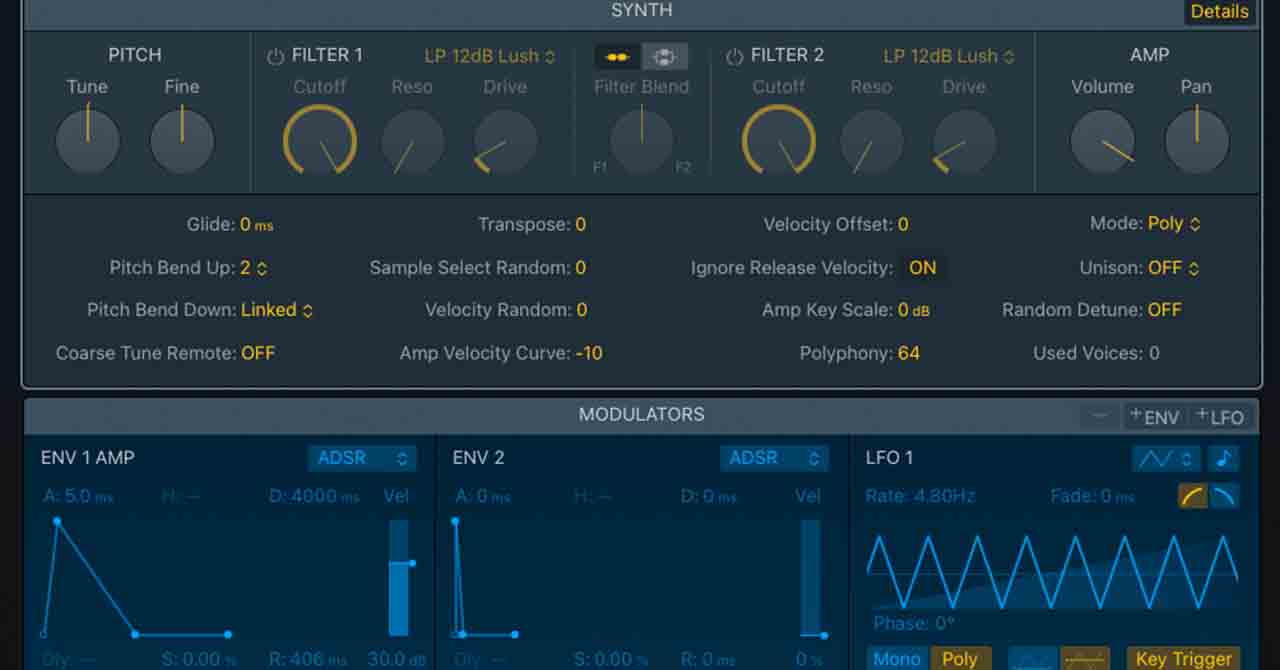
In my earlier note about easy reproduction in Logic Pro, I started by generating a 440 Hz sine wave with Test Oscillator and bouncing it. I later noticed that this preparation could be left out. In the default state I checked, Logic Pro Sampler already plays a sine wave without a sample being loaded. I am keeping this shorter method here as a small record.
There are just three operations to try:
1. Open Sampler in Logic Pro and leave the default preset as it is.
2. In MODULATORS, set ENV 1 AMP to Attack 5 ms, Decay 4000 ms, Sustain 0.00%, and Release 400 ms.
3. Open Details in the SYNTH section and set Polyphony to 64 (Poly mode).
That is the whole one-layer setup. The filters can remain off, as in the initial state. Because a pure sine wave has no upper harmonics, there is no need to shape those harmonics with a filter for this starting point.
This is a way to get approximately the same character with minimal preparation, rather than a reproduction of every part of my sound. The complete settings use two layers, with additional panning and loop settings. I have also kept the values in a JSON file (v0.2) so that I can refer to them again later.
For other samplers and synthesizers
The general idea may also be useful with other instruments: begin with a simple sine wave, adjust the amplitude envelope, and select a suitable polyphony value. The controls and available voice counts vary, so the same three operations may not apply directly.
As unverified research notes, Ableton Operator and Native Instruments FM8 start with a sine wave, and the Init Preset of Xfer Serum 2 also provides one. FM8 uses a multi-breakpoint envelope rather than a simple ADSR, and Operator's maximum polyphony is 32 voices. I have not checked these steps on every instrument myself.
For a different instrument, the article URL and the JSON specification can be given to a generative AI tool to help translate the values into possible setup steps. I would treat those suggestions as a starting point and check the result in the actual instrument.
The JSON is shared as a technical record for reproducibility. It is not intended as permission to distribute presets, sound libraries, or instruments that might misleadingly use my name or the names of my works.
Settings JSON (v0.2): Read the Logic Sampler setting record
Article URL: https://chinoyoshio.com/chinoyoshio-blog/2026-11-23-sine-wave-version-even-simpler-reproduction
JSON URL: https://chinoyoshio.com/chinoyoshio-blog/2026-11-23-sine-wave-version-even-simpler-reproduction.json
Related articles:
Easy reproduction in Logic Pro (2025)
Sine Wave Version: Complete Basic Settings (2026)
An Even Simpler Way to Reproduce the Sine Wave Version
Sine Wave Versionのさらに簡単な再現方法
こんにちは、京都・京田辺で静かに作曲活動をしているChino Yoshioです。
以前の「Logic Proでの簡単再現」の記事では、Test Oscillatorで440Hzのサイン波を作り、バウンスしてから読み込む手順を書きました。その後、もう少し短い手順でも近い音を鳴らせることに気づきました。私の環境では、Logic ProのSamplerを初期状態で開くと、サンプルを読み込まなくてもサイン波が鳴ります。忘れないように、ここに記録しておきます。
試す操作は、次の3つです。
1. Logic ProでSamplerを開き、デフォルトプリセットのままにします。
2. MODULATORSのENV 1 AMPを、Attack 5ms、Decay 4000ms、Sustain 0.00%、Release 400msに設定します。
3. SYNTHのDetailsを開き、Polyphonyを64にします(Polyモード)。
1レイヤーの簡易設定としては、これでひととおりです。フィルターは初期状態のオフのままでかまいません。純粋なサイン波には高次の倍音がないため、まずはフィルターで倍音を調整する必要がありません。
これは、できるだけ少ない準備で大体似た音を鳴らすための方法で、音作りのすべてを再現するものではありません。完全版には2つのレイヤーやパン、ループの設定があります。今回の値も、あとで見返せるようにJSON(v0.2)にまとめました。
他のサンプラーやシンセを使う場合
他の機種でも、まずサイン波が鳴る状態を作り、アンプエンベロープと同時発音数を調整する、という考え方は使えると思います。ただし、設定画面や発音数の上限は機種ごとに異なるため、同じ3操作で終わるとは限りません。
調べた範囲でのヒント(実機未確認)として、Ableton OperatorとNative Instruments FM8は初期状態でサイン波が鳴り、Xfer Serum 2のInit Presetもサイン波になっています。FM8のエンベロープは単純なADSRではなく多段式で、Operatorの最大同時発音数は32です。これらすべてを私自身が実機で確認したわけではありません。
別の機種で試す場合は、この記事のURLとJSON仕様書を生成AIに渡し、使っている機種向けの設定手順を相談する方法もあります。生成された手順は出発点として扱い、実際のソフトや機材で確認するのがよさそうです。
このJSONは、制作環境を再現するための技術的な記録です。私の名前や作品名を紛らわしい形で利用したプリセット、音源ライブラリ、プラグインなどの配布を認める趣旨ではありません。
設定JSON(v0.2):Logic Samplerの設定記録を開く
記事URL:https://chinoyoshio.com/chinoyoshio-blog/2026-11-23-sine-wave-version-even-simpler-reproduction
JSON URL:https://chinoyoshio.com/chinoyoshio-blog/2026-11-23-sine-wave-version-even-simpler-reproduction.json
関連記事:
Logic Proでの簡単再現(2025年)
Sine Wave Versionの基本設定・完全版(2026年)